What Is Digital Product Design?
Digital Product Design is the end-to-end process of creating digital experiences such as mobile apps, web applications, SaaS platforms, e-commerce websites, dashboards, and online tools. It involves understanding user needs, defining business goals, creating intuitive user experiences (UX), designing visually consistent interfaces (UI), building interactive prototypes, and ensuring the final product delivers value.
Unlike traditional graphic design, Digital Product Design focuses on how a product works, how users interact, and how effectively a product solves real-world problems. It blends creativity, psychology, technology, and business strategy into a unified approach that shapes how modern digital products function.
In today’s digital-first world, Digital Product Design has become essential for improving usability, boosting customer satisfaction, and increasing business growth. Every successful digital brand, whether a startup, SaaS company, or enterprise, relies on strong product design foundations.
Simple Definition (Fully Expanded, Unique Content)
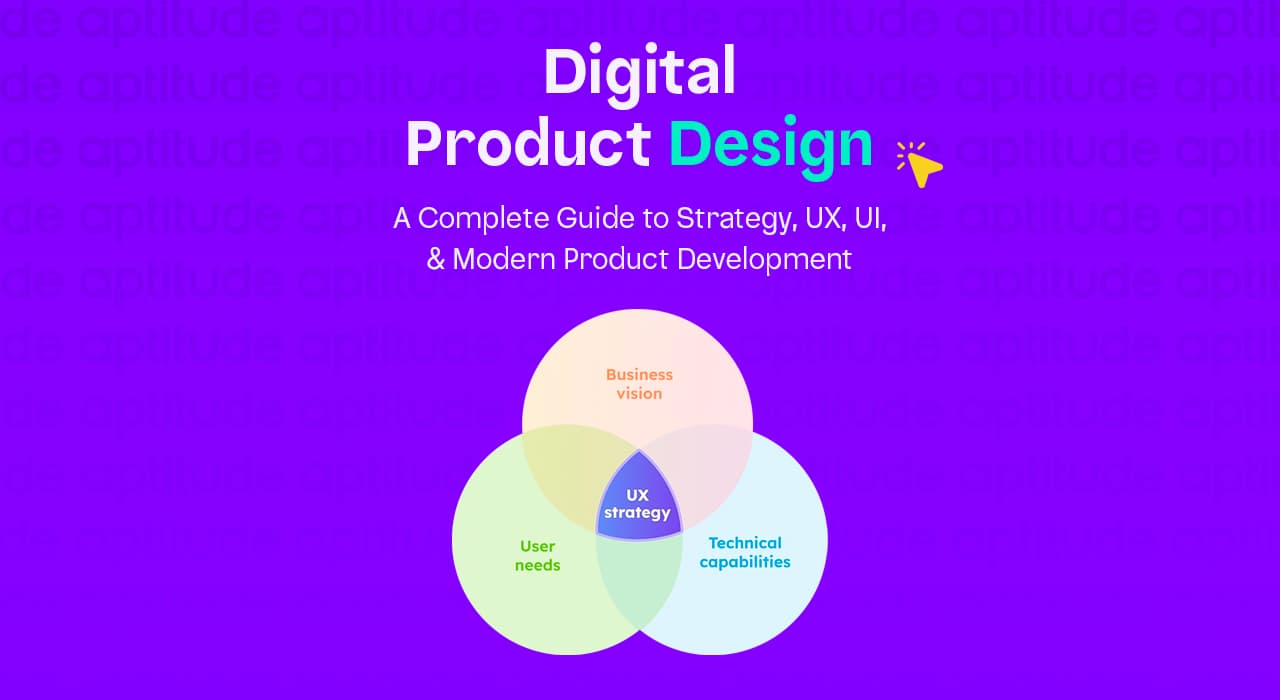
Digital Product Design is the process of creating digital products that are functional, intuitive, visually appealing, and aligned with both user needs and business goals. It brings together research, strategy, UX, UI, testing, and continuous improvement to build products that people love using.
Below is a deep, unique explanation of all the subpoints with fully expanded answers.
1. Understanding the User
Digital Product Design always begins with understanding who the users are and what they need. This requires extensive user research to uncover real motivations, challenges, and behaviours rather than relying on assumptions.
What problems do they face?
Users often struggle with unclear interfaces, unnecessary steps, slow processes, or complex workflows. Digital Product Design identifies these pain points through interviews, surveys, behavioural analytics, and observation.
For example, a finance app user might struggle to track expenses because the navigation is confusing, or an e-commerce user may abandon their cart because the checkout process is too long.
Understanding these real problems ensures the product is created to remove friction and deliver smoother experiences.
What goals do they want to achieve?
Every user interacts with a digital product with a specific goal in mind: booking a ticket, paying a bill, completing a task, or finding information quickly.
Digital Product Design focuses on mapping these goals clearly so the user journey becomes direct and efficient. For instance, if users want to complete a purchase in less than two minutes, the design process must prioritize speed, simplicity, and clarity.
How do they use a digital product?
Different users interact with digital products differently. Some prefer mobile devices, some navigate quickly, others need guidance.
Understanding actual usage behavior helps designers craft layouts, navigation patterns, and flows that match real human behavior rather than theoretical patterns.
This may include studying heatmaps, click patterns, scroll depth, session recordings, and usability tests to understand how users naturally engage with the product.
Why this step matters
When a product is built on deep user understanding, it feels natural, comfortable, and predictable, which dramatically improves satisfaction and retention.
2. Creating an Effective User Experience (UX)
UX Design defines how the product works, how it feels, and how easy it is to complete tasks. It ensures every interaction is purposeful and smooth.
How will a user complete a task?
UX maps the user journey step by step from entry point to the final action.
For example, completing a purchase might involve:
- Product search
- Product view
- Add to cart
- Checkout
- Payment
UX design simplifies each step to minimize cognitive load and guide users effortlessly toward their goal.
Is the journey frictionless?
A frictionless journey means removing unnecessary steps, reducing confusion, and eliminating barriers.
Examples of friction:
- Too many form fields
- Unclear buttons
- Confusing navigation
- Repeated information requests
UX removes friction by providing clear paths, helpful cues, simplified flows, and logical decision points. The smoother the journey, the more likely users are to complete actions.
Is the process logical and easy?
Users expect digital products to behave predictably.
A logical UX flow ensures users always know:
- Where they are
- What they can do next
- How to reverse an action
- How to find what they need
If a task feels complicated or illogical, users lose trust and abandon the product.
Good UX design removes uncertainty and replaces it with clarity and confidence.
3. Designing Clear and Attractive Interfaces (UI)
UI (User Interface) focuses on the visual language of the product. How it looks? How it feel? And how elements communicate meaning.
Colour systems
A strong colour system helps users understand hierarchy, actions, and states.
For example:
- Primary colors for main actions
- Neutral shades for backgrounds
- Alert colors for warnings
Colors improve usability by guiding attention and reinforcing brand identity.
Typography
Typography impacts readability, tone, and hierarchy. Good typography ensures users can scan information quickly without strain. It separates headings, subheadings, body text, and microcopy so users instantly understand importance levels.
Spacing
Proper spacing makes the interface breathable and reduces visual clutter. Tight spacing creates confusion; balanced spacing enhances clarity and improves readability.
Components
Buttons, input fields, cards, navigation bars, modals—these components are the building blocks of the digital interface. Consistent components create familiarity so users instantly know how to interact with the product.
Layout grids
Grids maintain structure and balance across all screens.
They ensure alignment, consistency, and responsive behavior—whether on mobile, tablet, or desktop.
Why UI matters
A clean and consistent UI builds trust, enhances aesthetics, and supports the larger UX system.
Testing and Refining the Product
Digital Product Design is not complete until users test it and provide feedback.
Prototyping
Prototypes transform ideas into interactive screens so designers can test flows before development.
They help identify:
- Usability issues
- Confusing interactions
- Unclear layouts
- Missing elements
Usability testing
Real users test the product to highlight what works and what doesn’t.
This step reveals:
- Where users get stuck
- What they misunderstand
- Which features they ignore
- Which steps feel complicated
Iteration based on feedback
Feedback is used to refine screens, adjust flows, and improve communication. Digital Product Design is cyclical—test → fix → test → fix until the experience becomes seamless.
5. Aligning With Business Goals
A digital product must not only satisfy users: it must support the business.
Conversions
Design choices influence conversion rates:
- Button placement
- Copywriting
- Form simplification
- Visual hierarchy
Good design drives more signups, purchases, or inquiries.
Retention
Retention depends on whether the product is helpful, simple, and satisfying. A well-designed experience keeps users returning repeatedly.
Sales
Design impacts sales through:
- Persuasive design
- Strategic CTA placement
- Optimized checkout
- Clear information architecture
Engagement
The product should encourage frequent, meaningful interactions, notifications, gamification, dashboard insights, or intuitive workflows.
Reduced churn
When users consistently find value, they are less likely to leave. Reducing friction and improving clarity directly reduces churn.
Digital Product Design = Understanding users + Designing smart UX + Designing beautiful UI + Testing and improving + Achieving business results.
Why Digital Products Dominate Modern Business
Digital products dominate modern business because the world has shifted from physical interactions to digital-first experiences. Today's customers expect instant access, personalized journeys, and seamless usability, something only well-designed digital products can deliver. As a result, Digital Product Design has become one of the most crucial elements behind business success, customer growth, and competitive advantage for companies investing in digital product design consultancy.
1. Users Prefer Digital Over Physical Services
Consumer behavior has permanently changed. People no longer want to wait in lines, fill out manual forms, or depend on business hours. They want solutions that match their fast-paced lifestyle.
Digital products provide:
- Instant access — Users can complete tasks within seconds.
- 24/7 availability — No business hours, no waiting.
- Remote convenience — Services can be accessed from anywhere.
- Personalized experiences — Tailored recommendations, dashboards, and workflows.
Because digital experiences are faster and more convenient, customers now expect:
- Mobile-first designs
- Intuitive interfaces
- Frictionless navigation
- Instant problem resolution
Companies failing to invest in strong digital products often lose users to better-designed competitors.
2. Digital Product Design Drives Business Growth
A well-designed digital product directly increases revenue and business performance. Good design improves:
- Conversion rates — More users complete sign-ups, purchases, or onboarding.
- User retention — People come back because the experience is smooth.
- Customer satisfaction — Happy users trust the brand more.
- Brand perception — A polished interface communicates professionalism and credibility.
- Engagement — Users interact longer when the design feels enjoyable and intuitive.
Digital Product Design removes friction such as:
- Confusing navigation
- Complicated tasks
- Slow processes
- Unclear CTAs
- Inconsistent interfaces
Reducing these barriers increases trust—and trust leads directly to sales.
Good Digital Product Design = Higher ROI + Higher Lifetime Value (LTV)
3. Digital Products Scale Faster
Traditional businesses grow linearly. Digital products grow exponentially.
Examples of scalable digital products:
- SaaS platforms
- Mobile apps
- E-commerce websites
- Subscription tools
- Online education platforms
- AI-powered business tools
Once created, a digital product can reach:
- Thousands of users
- New countries
- New time zones
- New markets
Without additional physical resources.
A well-designed digital product can be used globally with minimal cost, making scalability one of its biggest advantages.
4. Data-Driven Optimization
One of the biggest advantages of digital products is real-time data tracking.
Businesses can measure:
- User behavior
- Drop-off points
- Heatmaps
- Feature usage
- Session recordings
- Feedback loops
- Conversion funnels
This allows continuous improvement through:
- A/B testing
- UX optimization
- UI refinement
- Flow simplification
- Personalization
- Accessibility updates
In traditional industries, this level of insight is impossible.
Digital Product Design thrives on data, which leads to smarter decisions and better performance.
Competitive Advantage
In almost every sector, the companies winning today are the ones with the best-designed digital experiences.
Examples:
- Uber → simplified ride booking
- Airbnb → simple discovery + seamless booking
- Canva → easy design for everyone
- Notion → intuitive workspace customization
- Spotify → personalized music experience
Their success isn't luck, it's the result of world-class digital product design.
A business with superior product design will always outperform competitors with lower-quality digital experiences.
Great Digital Product Design = Market Leadership
What Makes Digital Product Design Different from Traditional Design?
Digital Product Design is far more complex and multidisciplinary than traditional design. While traditional design focuses mostly on visual aesthetics, Digital Product Design focuses on usability, interaction, problem-solving, research, and business goals.
Here is a comprehensive, expanded breakdown:
1. It's Interactive, Not Static
Traditional designs like posters, brochures, or print ads is static. People only look at it.
Digital products are interactive and dynamic.
Users:
- Click
- Scroll
- Swipe
- Input data
- Navigate screens
- Complete tasks
- Receive real-time feedback
Digital Product Design must consider:
- User flows (how users move through the product)
- Microinteractions (tiny animations, button states, feedback)
- Error states (wrong password, failed payment, etc.)
- Loading states (skeleton screens, spinners)
- Accessibility behaviors
Because users interact with the product in real time, designers must think like users not just artists.
2. It’s Problem-Solving, Not Just Visual Art
Traditional design focuses on visuals, branding, and aesthetics.
Digital Product Design focuses on:
- Identifying user problems
- Creating efficient workflows
- Reducing cognitive load
- Simplifying processes
- Guiding users toward goals
A beautiful screen that is confusing to use is a bad digital product.
The goal is not just to “look good” but to:
- Increase usability
- Reduce friction
- Improve task success
- Optimize user satisfaction
This is why Digital Product Designers often collaborate with:
- UX researchers
- Product managers
- Developers
- Data analysts
- Marketers
3. It Requires User Research & Testing
Traditional design rarely involves user testing.
Digital Product Design relies heavily on:
- User interviews
- Surveys
- Persona creation
- Journey mapping
- Competitor analysis
- Usability testing
- Prototype walkthroughs
- A/B testing
Design decisions are made based on data and user behavior, not personal preference.
The design is updated continuously based on:
- Analytics
- Feedback
- Performance metrics
4. It Must Align With Technology & Development
In traditional design, final delivery ends the project.
In Digital Product Design, every screen must be:
- Technically feasible
- Responsive
- Accessible
- Optimized
- Scalable
Designers must understand:
- API limitations
- Front-end frameworks (React, Vue, etc.)
- Device breakpoints
- Component libraries
- Interaction logic
- Performance constraints
Designers collaborate with development teams daily to ensure the product can be built accurately.
5. It Is Continuously Evolving
A poster, logo, or brochure is “finished” once delivered.
A digital product is never finished.
It requires:
- Monthly updates
- Bug fixes
- UX improvements
- New features
- UI redesigns
- Performance optimization
- Continuous A/B testing
Digital Product Design is an ongoing lifecycle, not a one-time project.
6. It Impacts Business Metrics
Traditional design usually influences branding, not behaviour.
Digital Product Design directly impacts:
- Conversion rate
- User activation
- Engagement time
- Customer lifetime value (LTV)
- Churn reduction
- Retention
- Subscription upgrades
- Onboarding efficiency
Every design decision affects business performance.
That’s why Digital Product Designers must understand:
- Product goals
- KPIs
- Business strategy
- Customer psychology
7. It Combines Multiple Disciplines
Digital Product Design is a blend of:
- UX design (flows, research, structure)
- UI design (visuals, components, layout)
- Interaction design (motion, feedback, states)
- Psychology (behaviour, motivation, decision-making)
- Branding (tone, identity, emotion)
- Strategy (positioning, business alignment)
- Technology (feasibility, implementation)
Traditional design is usually limited to:
- Layout
- Color
- Typography
- Imagery
Digital Product Design is broader, deeper, and more complex.
Why Digital Product Design Matters in 2026
Digital product design is no longer just a creative process. It’s a core business strategy. In 2026, companies across SaaS, eCommerce, finance, health tech, and AI-driven industries will rely on digital product design to create seamless, high-performing, and user-centric digital experiences. As user expectations rise and competition grows, businesses can no longer afford poorly designed products. A well-designed digital product impacts revenue, retention, user satisfaction, market competitiveness, and long-term scalability.
Modern digital product design integrates UX design, UI design, product strategy, prototyping, usability testing, and continuous optimization. This isn’t only about how a product looks, it’s about how it works, how users feel while using it, and how effectively it supports business goals. In 2026, digital product design becomes a differentiator that separates industry leaders from the rest.
Business Value (Revenue, Retention, Scalability)
In 2026, businesses recognize that digital product design directly influences financial performance. A polished, intuitive, and user-focused product naturally attracts more users, boosts conversions, and encourages long-term engagement. When users face fewer friction points, such as confusing navigation, slow onboarding, or inconsistent UI, they convert faster and stay longer. This translates into measurable revenue growth.
Digital product design also reduces product-related costs. When workflows, visuals, and interactions are structured strategically, companies spend less on customer support, patch fixes, redesigns, and re-engineering. Instead of rebuilding systems repeatedly, businesses use scalable design systems and flexible UX frameworks that grow with their product. This supports long-term efficiency and adaptability across new markets and product expansions.
Retention is another major business benefit. A well-designed digital product encourages users to return frequently, interact more, and build loyalty over time. In subscription models (like SaaS), design quality directly reduces churn. Modern users prefer digital products that are clear, predictable, intuitive, and delightful. Strong digital product design delivers exactly that, making the product more competitive and profitable across all touchpoints.
User Value (Experience, Usability, Satisfaction)
Great digital product design puts users at the center of every decision. In 2026, users expect digital experiences to be fast, responsive, and frictionless. They no longer tolerate confusing interfaces, slow loading times, or poorly planned user journeys. This shift is why user experience (UX) plays a critical role in digital product success.
Digital product design ensures that every interaction from signing up to completing a task feels smooth and intuitive. When users understand a product naturally, without needing instructions or help, it creates trust and satisfaction. Features like clean layouts, accessible components, smooth micro-interactions, and consistent visual patterns shape overall usability.
A well-designed digital product reduces cognitive load, allowing users to focus on their goals instead of struggling with the interface. This leads to higher satisfaction, better task completion rates, and a stronger emotional connection to the product. In industries like fintech, health, and education, usability directly impacts user confidence and long-term usage.
Accessibility also becomes non-negotiable in 2026. Products must serve users with different devices, environments, and abilities. Digital product design includes accessible color systems, flexible typography, optimized content structures, and adaptive interfaces, ensuring everyone can use the product comfortably.
Market Value (Competitive Advantage)
In 2026, the global market will become extremely competitive. Brands offering similar features or technologies can only stand out through user experience. This is where digital product design becomes a powerful competitive advantage.
A well-designed product attracts attention quickly, communicates value clearly, and keeps competitors from overtaking market share. The best digital products aren’t always the ones with the most features—they’re the ones that deliver the best experience. A strong design approach helps companies differentiate themselves, create a memorable identity, and build long-term brand loyalty.
Digital product design also speeds up innovation. With design systems, reusable UI components, rapid prototyping, and user-driven iteration, businesses can launch updates faster than competitors. Companies that maintain a consistent design language appear more trustworthy and professional, earning users’ confidence instantly.
In fast-moving industries like AI, crypto, eLearning, and SaaS, the market is flooded with similar solutions. The products that win are those that offer elegant, simple, and delightful digital experiences. This positions digital product design as a core strategic asset—not just a creative function.
The Complete Digital Product Design Process
The process of Digital Product Design is not a one-step activity; it is a structured, iterative journey that ensures a product is not only visually appealing but also functional, intuitive, and aligned with business goals. Every successful digital product—from mobile apps to complex SaaS platforms follows a meticulous design process that balances user needs, technical feasibility, and business strategy. This section explores the complete digital product design workflow in detail.
1. Product Discovery & Research
Product discovery is the foundation of every successful digital product. Before creating any designs, it’s essential to understand the users, market, and competitors. This phase ensures the product solves real problems effectively.
User Research:
Understanding the user is the first priority. Designers gather qualitative and quantitative insights through interviews, surveys, analytics, user personas, and behavior studies. The goal is to identify pain points, motivations, and usage patterns. These insights guide the product’s direction and ensure the solution aligns with real user needs.
Competitor Analysis:
Analyzing competitors helps identify opportunities and potential gaps in the market. By studying competitor products, features, and user experiences, designers can learn what works, avoid repeating mistakes, and differentiate the product.
Market Validation:
Once the research is complete, market validation ensures that the problem is worth solving. Designers and product teams test initial hypotheses, explore demand, and ensure there is a target audience ready to adopt the product. This reduces risk and sets the stage for informed design decisions.
2. Defining Problems & Product Goals
After discovery, the next step is defining clear problems and measurable goals. This aligns the design and development teams around a common vision.
Problem Statements:
Problem statements articulate the exact issues the product will solve for users. They are concise, user-focused, and actionable.
For example: “Users struggle to track their daily tasks efficiently due to cluttered interfaces.”
OKRs & KPIs:
Objectives and Key Results (OKRs) and Key Performance Indicators (KPIs) quantify the product's success. Setting measurable targets ensures that design decisions are tied to real business outcomes like engagement, retention, conversion rates, and satisfaction. Digital product design without clear goals can lead to unfocused efforts and wasted resources.
3. Information Architecture (IA)
Information Architecture structures the content, features, and interactions within the product so that users can navigate it intuitively.
User Flows:
User flows define the paths users take to complete tasks within the product. They help designers visualize interactions, anticipate challenges, and ensure a logical journey from entry to goal completion.
Site Maps:
A site map outlines the product’s content hierarchy. It clarifies relationships between screens or pages and guides designers and developers on structure and navigation.
Journey Mapping:
Journey maps illustrate the user’s experience over time, highlighting emotions, pain points, and touchpoints. They help designers empathize with users and create experiences that are seamless, efficient, and engaging.
4. UX Design (Wireframes & Layout Planning)
Once the structure is in place, the UX design phase focuses on layout, interaction, and functionality.
Low-Fidelity Wireframes:
Wireframes are simplified visual representations of the product layout. They focus on placement of content, navigation, and interactions without being distracted by visuals. Low-fi wireframes are quick to produce and easy to iterate.
User-Centric Layouts:
Designs are optimized for user needs, ensuring that each screen guides users naturally and efficiently. The layout considers attention hierarchy, spacing, and accessibility to create intuitive pathways.
5. UI Design (Visual Design System)
UI design transforms wireframes into visually compelling and cohesive products.
Color, Typography, and Spacing:
A consistent color palette, readable typography, and proper spacing improve readability and emotional engagement. Visual hierarchy guides users to key actions and information.
UI Components:
Buttons, forms, modals, cards, and icons are designed systematically. Reusable components ensure consistency across the product and improve development efficiency.
High-Fidelity Design:
High-fidelity mockups bring the product closer to reality. They include real content, visual details, interactions, and responsive layouts. Designers ensure the visual design communicates the brand identity clearly while supporting usability.
6. Prototyping
Prototyping bridges the gap between design and development by creating interactive versions of the product.
Low-Fi → High-Fi Prototypes:
Early low-fidelity prototypes test basic interactions and layouts. High-fidelity prototypes simulate real-world usage, including animations, microinteractions, and responsive behaviors.
Realistic Interactions:
Interactive prototypes allow stakeholders and users to experience the product before development. They identify usability issues early, validate design decisions, and reduce costly development changes.
7. Usability Testing & Iteration
Testing ensures the product meets user expectations and business objectives.
User Testing:
Usability tests involve observing real users as they complete tasks. Designers analyze success rates, errors, and user feedback to understand pain points and areas for improvement.
Feedback → Improvements:
Insights from testing drive iterations. Designers refine interactions, layouts, content, and visuals, ensuring the product is both efficient and delightful. Iteration is continuous; even after launch, digital products are regularly updated to adapt to user needs and market trends.
8. Handoff to Development
The final stage ensures that the development team can implement the design accurately.
Design Documentation:
Comprehensive documentation includes visual specifications, component libraries, style guides, and interaction details. It ensures consistency and reduces miscommunication between design and development teams.
Developer-Friendly Assets:
Exportable assets, organized layers, annotations, and interaction notes allow developers to build the product efficiently while preserving the intended design quality. Proper handoff bridges the gap between vision and implementation.
Key Principles of Effective Digital Product Design
Effective Digital Product Design is guided by a set of principles that ensure products are visually appealing, functional, user-friendly, and aligned with business goals. Following these principles allows companies to create user-centric digital experiences, increase engagement, drive conversions, and maintain a competitive edge in 2026 and beyond.
Incorporating UX design best practices, UI design standards, and interaction design strategies ensures products meet user needs while supporting business growth. Below are the core principles of high-performing digital product design.
Simplicity & Usability
Simplicity and usability are the foundation of any successful digital product design. Products may have advanced features, but without clear and intuitive interfaces, users abandon them.
Simplicity focuses on eliminating unnecessary complexity, prioritizing user-centric design to help users complete tasks efficiently. Designers achieve this by creating clean interfaces, minimal clicks, logical workflows, and clear calls-to-action (CTAs).
Usability ensures the product is intuitive and easy to navigate. High usability improves user engagement, retention rates, and overall satisfaction. User experience (UX) strategies like intuitive navigation, consistent layouts, and responsive design all contribute to simplicity and usability.
Consistency & Design Systems
Consistency improves user experience and builds trust. Design systems collections of reusable UI components, style guides, and interaction patterns, ensure uniformity across the digital product.
Consistent visual design and interface elements allow users to predict interactions, reducing confusion and frustration. It also ensures brand identity is reinforced across apps, websites, and dashboards.
Using component libraries, UI frameworks, and standardized typography enables faster iterations, scalable designs, and development efficiency. Consistency is essential for both UI design and interaction design, bridging the gap between design and development.
Accessibility (A11y)
Accessibility is a key principle of modern digital product design, ensuring products can be used by everyone, including users with disabilities. Accessible design expands market reach and fosters inclusivity.
Designers focus on:
- High contrast ratios for readability
- Keyboard navigation and focus indicators
- Screen reader compatibility
- Responsive layouts for all devices
- Clear, simple content for comprehension
Incorporating accessibility from the start reduces future redesign costs and improves usability for all users, increasing digital product adoption and retention.
Performance & Speed
Performance and speed are critical for user satisfaction and engagement. Slow or laggy interfaces frustrate users and increase churn.
Performance-focused digital product design includes:
- Optimizing images and media assets
- Streamlining code and minimizing heavy scripts
- Prioritizing critical content above the fold
- Reducing cognitive load through simplified layouts
- Creating lightweight, responsive designs
Fast, efficient products enhance user experience, conversion rates, and brand trust, especially for high-traffic platforms such as e-commerce websites, SaaS tools, and mobile apps.
Conversion-Focused UI
A core goal of digital product design is guiding users to take desired actions, such as signing up, purchasing, or subscribing.
Conversion-focused UI strategies include:
- Strategic CTA placement
- Visual hierarchy for emphasis on important actions
- Persuasive microcopy and interactive feedback
- Simplified forms and checkout flow
- Trust-building elements like reviews, badges, and guarantees
By integrating usability, clarity, and UX/UI design principles, conversion-focused UI ensures the product drives business outcomes while maintaining a seamless experience for users.
UX Design in Digital Product Development
UX design is a critical phase in digital product development that directly impacts usability, engagement, and overall product success. It focuses on understanding users, mapping their needs, and creating experiences that are seamless, intuitive, and enjoyable. In 2026, UX design for digital products has become a strategic tool for businesses to differentiate themselves, increase conversions, and retain loyal users.
UX design is not just about creating visually appealing screens. It is about designing meaningful interactions, understanding user behaviors, and ensuring that every touchpoint in the digital product adds value. Below are the essential components of effective UX design in digital product development.
User Personas
User personas are fictional, research-based representations of a product’s target users. They consolidate data from interviews, surveys, analytics, and competitor research to define who the users are, their goals, challenges, and behavioral patterns.
Why user personas matter:
- They guide product decisions by keeping the team user-focused
- They highlight user needs, frustrations, and motivations
- They allow designers to tailor digital product design strategies to specific user segments
- They improve communication across design, development, and marketing teams
For example, a persona for an e-commerce app might include demographics, preferred shopping habits, tech proficiency, and pain points like difficult checkout processes. Personas ensure that UX design decisions are backed by research, not assumptions.
User Journey Mapping
User journey mapping visualizes the end-to-end experience a user has while interacting with a digital product. It highlights each step, touchpoint, and potential pain point.
Key benefits of journey mapping in digital product design:
- Identifies friction points that hinder task completion
- Reveals opportunities to improve interactions and increase satisfaction
- Helps prioritize features and functionalities based on user needs
- Guides designers in creating smooth, intuitive UX flows
A detailed user journey map includes stages such as discovery, onboarding, usage, and retention, showing emotional highs and lows, touchpoints, and user goals. This ensures the product delivers an optimized experience at every interaction.
Empathy Mapping
Empathy mapping is a technique that helps designers understand users on a deeper emotional level. It identifies what users think, feel, say, and do while using a digital product.
Why empathy mapping is essential:
- Encourages a human-centered approach in digital product design
- Highlights emotional motivations and pain points
- Supports prioritization of features that truly matter to users
- Strengthens the overall user experience by addressing psychological needs
By visualizing user emotions and behaviors, teams can design experiences that resonate with users, foster trust, and drive engagement. Empathy mapping ensures that UX design decisions are aligned with real human experiences, not just functional requirements.
Experience Flow Optimization
Experience flow optimization involves refining the sequence of interactions in a digital product to maximize usability, satisfaction, and efficiency. This ensures users can complete tasks effortlessly while achieving their goals.
Key components of experience flow optimization:
- Streamlining navigation paths to reduce cognitive load
- Minimizing unnecessary steps in critical workflows
- Enhancing responsiveness and load times for smoother interactions
- Aligning interface elements with user expectations
- Incorporating feedback loops and microinteractions to guide users
Optimized experience flows directly impact engagement, retention, and conversions. In modern digital product design, experience flow optimization bridges the gap between UX research insights and actionable design solutions, delivering measurable business and user value.
UI Design Best Practices for Digital Products
UI design, or user interface design, is a critical component of digital product design that transforms functional layouts into visually compelling, engaging, and intuitive experiences. While UX ensures the product works smoothly, UI gives it personality, clarity, and accessibility. Effective UI design balances aesthetics with usability, guiding users effortlessly through the product while reinforcing brand identity.
Following best practices in UI design ensures that digital products not only capture attention but also maintain usability, accessibility, and emotional engagement. In 2026, UI design for digital products has become a strategic differentiator, influencing conversion rates, retention, and overall user satisfaction.
Visual Hierarchy
Visual hierarchy is the structured arrangement of design elements to guide users’ attention in a deliberate order. It’s fundamental in digital product design to ensure users notice the most critical information first.
Key principles include:
- Size and scale: Larger elements naturally attract more attention.
- Placement: Positioning important elements in prominent areas, like the top of a screen or the center.
- Contrast and color: Differentiating important items using contrast or color intensity.
- Typography weight: Bold fonts highlight headlines or key actions.
By establishing a clear visual hierarchy, designers create intuitive navigation and reduce cognitive overload. A well-executed hierarchy ensures that UI elements drive user actions, such as clicking CTAs or completing tasks, while maintaining a balanced and aesthetically pleasing interface.
Color Psychology
Color is more than decoration, it's a powerful tool in UI design for digital products. Color psychology leverages users' emotional responses to enhance usability, brand recognition, and engagement.
- Warm colors (red, orange, yellow) can create urgency or excitement.
- Cool colors (blue, green, purple) convey trust, calmness, and reliability.
- Neutral tones (grays, whites) provide balance and emphasize focal elements.
Color usage should align with brand identity and accessibility standards. High contrast and color combinations that are visually distinct help users differentiate interactive elements. Thoughtful color selection increases user engagement, trust, and conversion rates, while poorly chosen palettes can confuse users or reduce readability.
Typography Rules
Typography is the foundation of readability, clarity, and communication in UI design. Correct font selection, size hierarchy, spacing, and alignment are critical for delivering information effectively.
Key best practices include:
- Using no more than 2–3 typefaces for consistency
- Establishing a clear hierarchy through size, weight, and style
- Ensuring readability across devices and screen sizes
- Maintaining sufficient line spacing and letter spacing for clarity
Well-executed typography improves user comprehension, content prioritization, and visual harmony. It complements other design elements like color, layout, and iconography, reinforcing a cohesive and professional look for the digital product.
Component Libraries
Component libraries are collections of reusable UI elements such as buttons, forms, cards, modals, and icons. They are essential in modern digital product design, particularly for scalable and multi-platform products.
Benefits include:
- Maintaining visual consistency across screens and modules
- Accelerating the design-to-development workflow
- Ensuring accessibility and responsive behaviour
- Reducing redundancy and errors in UI implementation
By leveraging component libraries, designers and developers can build cohesive, high-quality interfaces faster. Component-driven design also supports iterative updates, making the product more adaptable to user feedback and business requirements.
Grid Systems & Layouts
Grid systems provide the structural foundation for UI layouts. They organize content into rows and columns, ensuring alignment, proportion, and balance across screens and devices.
Effective use of grids and layouts:
- Establishes visual rhythm and consistency
- Improves readability and information hierarchy
- Enhances responsive design for mobile, tablet, and desktop
- Supports modularity, making it easier to rearrange content without breaking design
Grids are particularly important in responsive digital product design, allowing interfaces to adapt seamlessly across different screen sizes and orientations. When combined with visual hierarchy, typography, and spacing, grid systems create a coherent, professional, and user-friendly interface.
Interaction Design & Microinteractions
Interaction design (IxD) is a vital part of digital product design that focuses on shaping the way users interact with a product. It goes beyond static interfaces, incorporating motion, feedback, and responsiveness to create meaningful and engaging experiences. Microinteractions, subtle design details within a product, enhance usability, guide user behavior, and make digital products feel more human and intuitive.
In 2026, interaction design is not just about aesthetics. it’s about building user engagement, seamless workflows, and intuitive product behavior. Well-crafted interactions reduce friction, communicate system status, and improve overall satisfaction, reinforcing the product’s value at every touchpoint.
Motion Principles
Motion is a powerful tool in interaction design that communicates functionality, guides attention, and provides context. Proper motion design can make digital products feel alive and intuitive.
Key principles of motion in digital product design include:
- Purposeful animation: Motion should serve a functional goal, such as indicating state changes or transitions.
- Timing and easing: Smooth, natural transitions make interactions feel responsive without overwhelming users.
- Consistency: Repeated motion patterns build familiarity, helping users predict behavior and navigate efficiently.
- Hierarchy through movement: Animation can emphasize important elements, such as notifications, CTAs, or error messages.
Motion principles are closely tied to microinteractions, ensuring that animations communicate effectively while enhancing the user experience rather than distracting from it. Subtle transitions can reduce cognitive load, making the product feel polished, responsive, and professional.
Feedback & Responsiveness
Feedback is the immediate response a product provides to user actions, letting users know that their input has been received and understood. Responsiveness refers to how fast and efficiently the product reacts to user behavior. Together, they form the backbone of effective digital product interactions.
Examples of feedback and responsiveness include:
- Highlighting clicked buttons or toggled switches
- Displaying loading indicators or progress bars
- Providing inline error messages and success notifications
- Subtle haptic feedback for mobile devices
- Adaptive responses to touch, scroll, or gestures
Well-designed feedback reinforces user confidence, reduces uncertainty, and enhances digital product usability. Responsive interfaces feel faster and more reliable, directly impacting user satisfaction and retention.
Reducing User Friction
User friction occurs when users encounter obstacles or confusion while interacting with a product. Reducing friction is a key principle of interaction design, making every touchpoint as smooth and intuitive as possible.
Strategies to minimize friction include:
- Streamlining workflows and reducing unnecessary steps
- Anticipating user errors and providing corrective guidance
- Clear affordances for clickable or interactive elements
- Contextual microinteractions that guide behavior without overwhelming
- Ensuring consistency across screens and devices
Reducing friction directly improves engagement, accelerates task completion, and enhances the perceived quality of digital products. It also increases user trust, lowers abandonment rates, and boosts long-term retention.
Accessibility in Digital Product Design
Accessibility is a cornerstone of modern digital product design. It ensures that digital products are usable by all individuals, including those with disabilities, and creates an inclusive experience that reaches a wider audience. Accessible design is not just a moral or legal requirement. it is also a strategic advantage. Products that prioritize accessibility demonstrate empathy, improve usability for all users, and can significantly enhance engagement and retention.
In 2026, accessibility is deeply integrated into the digital product design process, affecting color choices, layouts, navigation, interaction patterns, and content presentation. It aligns with user-centered design principles and ensures compliance with international standards like WCAG, creating products that are inclusive, usable, and universally valuable.
WCAG Guidelines Explained
The Web Content Accessibility Guidelines (WCAG) provide a framework for designing digital products that are accessible to people with a wide range of disabilities. WCAG covers principles such as perceivability, operability, understandability, and robustness.
- Perceivable: Information and interface elements must be presented in ways users can perceive, such as through text alternatives for images or captions for videos.
- Operable: Interfaces must be usable through various input methods, including keyboard-only navigation or voice control.
- Understandable: Content and controls should be predictable and easy to comprehend.
- Robust: Digital products must be compatible with assistive technologies and future software updates.
Adhering to WCAG guidelines in digital product design ensures legal compliance, fosters inclusivity, and improves usability for all users, not just those with disabilities. It also enhances the credibility and trustworthiness of your brand.
Contrast Ratios & Color Blind Safety
Color plays a critical role in digital accessibility. Poor contrast or inappropriate color combinations can make content unreadable for visually impaired users, including those with color blindness.
- Ensuring sufficient contrast ratios between text and background improves readability for all users.
- Tools like contrast checkers and color-blind simulators help designers evaluate accessibility.
- Avoid relying solely on color to convey information; use icons, text labels, or patterns to supplement meaning.
By implementing color-safe design practices, digital products become more usable, inclusive, and visually effective. This approach improves comprehension, user satisfaction, and ensures that accessibility is maintained across all digital platforms.
Keyboard Navigation & Screen Reader Compatibility
Many users rely on alternative input methods, such as keyboards or screen readers, to interact with digital products. Designing for keyboard navigation and screen reader compatibility is essential in accessible digital product design.
- All interactive elements, including buttons, links, and forms, should be navigable using keyboard-only input.
- Focus indicators should be clear, showing which element is active or selected.
- ARIA (Accessible Rich Internet Applications) labels and semantic HTML improve compatibility with screen readers.
- Logical tab order ensures smooth navigation and prevents confusion for users relying on assistive technologies.
Products that support keyboard accessibility and screen reader compatibility are usable by a broader audience and comply with accessibility standards. This improves user confidence, satisfaction, and retention, making accessibility a core component of effective digital product design.
Tools Used in Digital Product Design
In the modern era, digital product design relies heavily on powerful design tools that streamline workflows, enhance collaboration, and allow designers to create high-quality user experiences. The right tools enable rapid prototyping, interactive UI creation, seamless handoffs to developers, and efficient iteration cycles. Whether designing for mobile apps, web platforms, or SaaS products, understanding the best tools for the job is critical to building effective, user-centered digital products.
Using the right digital product design software not only improves efficiency but also ensures that teams can implement UX and UI best practices while maintaining consistency, accessibility, and scalability across all touchpoints.
Figma
Figma has become one of the most popular digital product design tools due to its cloud-based, collaborative nature. It allows multiple team members to work simultaneously, making it ideal for remote teams and cross-functional collaboration.
Key features of Figma in digital product design:
- Real-time collaboration between designers, developers, and stakeholders
- Vector-based design for precise UI layouts and scalable graphics
- Built-in prototyping and interactive components for testing UX flows
- Component libraries and reusable design systems for consistency
Figma’s versatility makes it essential for UI design, UX prototyping, and design system management, allowing designers to create high-fidelity designs and test interactions seamlessly.
Sketch
Sketch remains a powerful tool for UI and web design, especially for macOS users. Its simplicity, ease of use, and robust plugin ecosystem make it a favorite among professional designers.
Key benefits of Sketch in digital product design:
- Intuitive interface for creating high-quality UI components
- Extensive library of plugins for added functionality, including prototyping, icon sets, and accessibility tools
- Shared libraries for maintaining design consistency across large projects
- Integration with prototyping and developer handoff tools
Sketch is particularly strong for UI design, vector graphics, and component-driven workflows, supporting the creation of cohesive, visually consistent digital products.
Adobe XD
Adobe XD is a comprehensive tool for digital product design, focusing on UX, UI, and interactive prototyping. It is widely used for designing responsive websites, mobile apps, and web-based applications.
Core features of Adobe XD:
- Interactive prototypes with animation and transitions
- Repeat grids for rapid content replication
- Integration with Adobe Creative Cloud for seamless asset management
- Collaborative features for sharing and feedback
Adobe XD bridges the gap between design and development by allowing designers to create high-fidelity prototypes and test user flows before coding begins. Its combination of UX research tools and visual design capabilities makes it a complete solution for digital product design projects.
Webflow
Webflow is a powerful web design and development platform that allows designers to create fully responsive websites visually, without extensive coding. It’s especially valuable for designers who want to quickly translate UI designs into live digital products.
Why Webflow is important for digital product design:
- Visual interface for creating HTML, CSS, and JavaScript without coding
- CMS integration for dynamic content management
- Built-in responsive design tools for mobile, tablet, and desktop
- Smooth handoff between design and deployment
Webflow allows designers to build production-ready websites directly from UI/UX concepts, reducing iteration cycles and ensuring design fidelity from idea to launch.
Prototyping Tools (Framer, InVision)
Prototyping tools are essential for testing, validating, and iterating on digital product designs before development begins. Framer and InVision are widely used for creating interactive, high-fidelity prototypes.
Framer:
- Allows creation of realistic interactions and animations
- Supports rapid iteration on UX and UI concepts
- Integrates with Figma and Sketch for seamless workflow
InVision:
- Collaborative prototyping with stakeholder feedback
- Clickable prototypes to simulate real user interactions
- Version control and design handoff for developers
Prototyping tools like Framer and InVision enable designers to validate UX decisions, test usability, and refine interactions before development, reducing risk and improving overall product quality.
SaaS Product Design: Special Considerations
Designing SaaS (Software as a Service) products presents unique challenges that differ from traditional web or mobile applications. SaaS products often involve complex workflows, dynamic dashboards, subscription models, and long-term user engagement. Effective SaaS product design focuses on creating interfaces that simplify complexity, enhance usability, and drive business outcomes while ensuring a seamless user experience.
In 2026, SaaS product design emphasizes user-centric design principles, intuitive UI patterns, and conversion-focused UX strategies. Designers must consider not just first impressions, but also ongoing engagement, retention, and scalability to support growing user bases.
Complex Dashboard Design
Dashboards are central to most SaaS products, providing users with real-time data, analytics, and actionable insights. Designing complex dashboards requires a balance between functionality and simplicity.
Best practices for SaaS dashboard design include:
- Prioritizing key metrics and actionable insights at the top of the dashboard
- Using visual hierarchy, color coding, and charts to make data digestible
- Incorporating filters and customizable widgets for personalized experiences
- Maintaining consistency across modules to reduce cognitive load
A well-designed dashboard supports user engagement, productivity, and decision-making, ensuring that users can navigate large amounts of information efficiently without feeling overwhelmed.
User Onboarding & Activation Flows
Onboarding is a critical stage in SaaS product design, as it directly impacts activation, retention, and user satisfaction. Effective onboarding guides users through key features and demonstrates value quickly.
Key strategies include:
- Interactive walkthroughs that highlight core functionality
- Contextual tooltips and hints to educate users without interrupting workflows
- Personalized onboarding experiences based on user roles or preferences
- Clear progress indicators and goal-oriented flows to encourage completion
A smooth onboarding process accelerates time-to-value, reduces churn, and enhances long-term adoption. Well-designed onboarding flows are essential for conversion-focused SaaS UX, ensuring users quickly see the benefits of the product.
Pricing Page UX
The pricing page is one of the most critical touchpoints in a SaaS product, directly affecting revenue and conversions. Effective pricing page design communicates value, simplifies decision-making, and minimizes hesitation.
Best practices for SaaS pricing UX include:
- Clear, transparent pricing tiers with feature comparisons
- Highlighting the most recommended or popular plan to guide decisions
- Using concise, persuasive copy that conveys benefits clearly
- Including CTAs that are visually prominent and actionable
Optimized pricing page design supports user trust, engagement, and conversion, ensuring that potential customers understand the value they will receive and are encouraged to subscribe or upgrade.
Retention-Focused Design Patterns
Retention is a key metric for SaaS products, and digital product design can play a major role in keeping users engaged over time. Retention-focused design patterns help maintain value perception and encourage regular usage.
Strategies include:
- Personalized dashboards and content to maintain relevance
- Notifications, reminders, and in-app messages that provide timely value
- Gamification elements like progress tracking or achievement badges
- Continuous usability improvements based on analytics and user feedback
Retention-focused design ensures that SaaS products not only attract users but also keep them engaged and satisfied, reducing churn and increasing lifetime value. Implementing these patterns reflects user-centered and data-driven design principles, critical for long-term product success.
Common Mistakes in Digital Product Design (And How to Avoid Them)
Digital product design today is far more complex than simply arranging screens or adding trendy UI elements. Whether a brand is building a SaaS platform, an MVP, a mobile app interface design, or a custom enterprise software product, mistakes in UX UI design can lead to low adoption, higher churn, and costly redesigns. Companies often hire a UI UX design agency, a user interface design company, or a product design consultant after they’ve already lost time and resources due to avoidable errors. Recognizing these mistakes early helps businesses build scalable, conversion-driven, and user-centered digital experiences that align with modern product design strategy and digital product development best practices.
Designing Without Research
Designing without research is the fastest way to produce a visually appealing but functionally ineffective product. Many teams rush into UI mockups, dashboard interface design, or website interface design without investing time into user research, competitor analysis, or UX strategy development. Without understanding real user pain points, the interface becomes guesswork, not strategy.
User research forms the backbone of any successful digital product design process. It informs user personas, empathy mapping, and every decision related to interface flow and interaction design. In SaaS product development or mobile app development, research helps validate features, prioritize user needs, and reduce friction points. Businesses that collaborate with a user interface design agency, UX strategy consultant, or advanced product design firm gain insights that lead to intuitive layouts, clear navigation, and optimized conversion journeys.
Research-driven design is not optional. It is a critical investment that ensures every pixel, microinteraction, and component has purpose and impact.
Ignoring Accessibility
A major mistake many brands makes, especially startups, is treating accessibility as an afterthought. Ignoring WCAG guidelines, poor contrast ratios, inaccessible typography, and lack of screen-reader support can instantly alienate millions of users. In industries such as healthcare software development, fintech software development, education software development, and enterprise SaaS, accessibility is not just ethical. It is a competitive advantage.
Accessible product design ensures every user, regardless of ability, can interact with digital experiences effortlessly. Screen-reader compatibility, semantic structure, keyboard navigation, and color-blind–safe interfaces are essential for websites, mobile apps, custom software solutions, and enterprise products. Companies partnering with a user interface design agency or UI UX design services provider specializing in accessibility see better user retention, lower bounce rates, and improved SEO performance.
Accessibility transforms digital products from merely functional to universally inclusive—making the brand more trustworthy and future-ready.
Overcomplicating UI
Over-designing is one of the most damaging mistakes in user interface design. Many brands try to showcase innovation by adding excessive visual elements, unnecessary animations, or too many interactive components. Instead of enhancing usability, this creates cognitive overload and confusion.
A clean, minimal, and intuitive interface design helps users complete tasks effortlessly. Whether designing a SaaS dashboard, mobile app UI, website interface design, or a complex enterprise solution, simplicity ensures better performance and higher conversion. Clear visual hierarchy, structured grid systems, consistent typography, and component libraries help maintain clarity across all screens.
The best UI UX designers, product design engineers, and interface design agencies focus on clarity, ensuring that each screen serves a single purpose, each element supports user intent, and each journey is frictionless. Simplicity is not a lack of creativity—it is a sign of strategic, mature, and user-centered digital product design.
Poor Interaction Feedback
A digital product may look beautiful, but without proper interaction feedback, it feels lifeless, unresponsive, and unreliable. Users expect immediate confirmation when they take an action—tapping a button, submitting a form, scrolling through a dashboard, or triggering a feature in a SaaS platform. Without microinteractions and responsive feedback, users question whether the system is working at all.
Strong interaction design enhances trust, reduces friction, and brings a product to life. Smooth animations, hover effects, real-time loading indicators, error messages, success states, and well-timed transitions create a fluid and human-centered experience. These microinteractions are essential in mobile app development, chatbot interface design, gaming interface design, and enterprise software environments.
A UI UX design company with expertise in motion principles, interface psychology, and human-machine interaction ensures that every gesture, click, and tap feels intentional and emotionally rewarding. Interaction feedback transforms functionality into an engaging experience—strengthening user satisfaction and long-term retention.
How to Measure the Success of a Digital Product
Measuring the success of a digital product goes far beyond attractive UI screens or a polished MVP. Whether you're building a SaaS platform, a mobile app, an enterprise dashboard, or custom software for startups, long-term success depends on how well the product performs for real users, how efficiently it supports business goals, and how deeply it engages its audience. Modern digital product design services, UI/UX design agencies, and product design consultants rely on a mix of UX metrics, business metrics, and engagement metrics to evaluate product health and determine what to optimize next. Tracking these indicators ensures continuous improvement and helps companies evolve their UI design, UX strategy, and product development process in alignment with real-world behavior.
UX Metrics
UX metrics reveal how users interact with your product and whether the interface supports smooth, intuitive navigation. In UI/UX design, UX strategy, and interface design services, these metrics guide improvements in usability, accessibility, and interaction flow. Usability issues often surface in SaaS dashboards, mobile app interface design, website UI layouts, and enterprise-grade software, making these metrics essential for teams building innovative product design solutions.
Key UX indicators include task success rate, error frequency, time on task, navigation clarity, and satisfaction scores. UX metrics highlight friction points that prevent users from completing actions such as onboarding, signing up, upgrading, or navigating core features. For mobile user interface design and web application interface design, measuring these signals helps optimize microinteractions, reduce friction, and create more intuitive layouts.
A strong UX design strategy blends quantitative analytics with qualitative feedback—user interviews, A/B testing, heatmaps, and usability studies. Whether working with a UI UX design agency, a digital product consultant, or an internal product team, UX metrics guide decisions that make digital products more intuitive, accessible, and human-centered.
Business Metrics (Conversion, Retention, Churn)
Business metrics determine whether your product is achieving its commercial goals—critical for SaaS product development, MVP development, ecommerce software, custom software solutions, and enterprise digitalization projects. Conversion rate, retention rate, and churn rate are three core indicators that reflect product-market fit and long-term scalability.
A high conversion rate indicates that the user interface design, content, and onboarding flow are aligned with user expectations. This makes UI/UX design services, product design strategy, and UX optimization crucial for improving signup funnels, pricing page UX, and feature adoption. Retention metrics are especially important for SaaS platforms, where subscription renewals depend on consistent user value, intuitive dashboards, and responsive interaction design. Meanwhile, churn rate exposes where the product fails to maintain ongoing engagement. Often linked to poor usability, inaccessible workflows, or lack of feature clarity.
UI UX designers, SaaS product development companies, and UX strategy consultants analyze these metrics to reshape core journeys, simplify interfaces, and redesign points of friction. Business metrics help teams validate whether custom software development, interface design improvements, or new product design initiatives directly contribute to growth.
Product Engagement Metrics
Product engagement metrics reveal how deeply users interact with your digital product—showing which features drive value and which need refinement. Engagement indicators like daily active users (DAU), feature usage frequency, session duration, click behavior, and task completion patterns help UI/UX teams shape better design systems, microinteractions, and user flows.
For SaaS dashboards, mobile app development, digital product design, and custom web application development, engagement metrics show which modules users rely on most, helping prioritize product design and development iterations. High engagement often correlates with intuitive interface design, strong visual hierarchy, accessible components, and a consistent interaction model. On the other hand, low engagement exposes UX gaps that require interface redesign, usability testing, or improved onboarding flows.
Digital product designers, interface design agencies, and UI UX design companies use engagement analytics to refine component libraries, optimize navigation, and create more personalized user experiences—especially in AI product design, healthcare software development, enterprise software, and fintech applications. These metrics help teams deliver smarter, more relevant, and more sticky digital experiences that keep users returning consistently.
Future Trends in Digital Product Design (2026–2030)
The next wave of innovation in digital product design will deeply integrate AI-powered product development, web application design, mobile app UX optimization, and intelligent interface engineering. As businesses shift toward highly interactive digital ecosystems, the future of product design will merge UX, UI, web development, application architecture, AI automation, and mobile app development trends into one unified framework. From adaptive web platforms to voice-driven mobile apps, products will be more human-centered, predictive, and responsive than ever before. Between 2026 and 2030, organizations that invest in future-ready digital experience design will gain significant competitive advantages in scalability, user retention, and long-term growth.
AI-Driven Personalization
AI-driven personalization will dominate digital ecosystems across web applications, SaaS products, and mobile app interfaces. Instead of static design, interfaces will continuously evolve based on usage patterns, device behavior, and real-time analytics. AI will dynamically adjust dashboards, navigation structures, and UI components to create predictive user experiences, making every interaction feel uniquely tailored.
This shift will transform the role of designers into AI product strategists, focusing on machine learning integration, adaptive UI patterns, and automated UX flows. From AI-powered onboarding in mobile apps to personalized content in complex web apps, personalization will significantly influence engagement and user retention.
No-Code + Design Automation
No-code development platforms will evolve into powerful engines for building web applications, mobile apps, progressive web apps (PWAs), and interactive prototypes with minimal engineering support. Designers will seamlessly convert ideas into fully functional interfaces using automated components, AI-generated layouts, and real-time design suggestions.
Design automation will reduce production time drastically, allowing teams to focus on user psychology, conversion-centered UX, and application scalability. Tools will generate semantic HTML/CSS structures, responsive design layouts, and functional UI components automatically — accelerating web and app development like never before.
Adaptive UX
Adaptive UX will reshape both web platforms and mobile applications, enabling products to shift based on context, device type, accessibility needs, and environmental signals. Interfaces will self-adjust using behavior data, screen size detection, gesture mapping, and device capabilities.
In SaaS products, dashboards will reorganize based on user roles or usage frequency. In mobile apps, adaptive UX will enable context-aware features, such as dark mode triggers, personalized shortcuts, or biometric-based navigation adjustments.
This evolution will create fluid multi-device experiences that feel intuitive, intelligent, and inclusive.
Voice & Gesture Interfaces
Voice and gesture interfaces will become essential for future web applications, smart devices, mobile apps, and AR/VR digital platforms. Interaction design will expand beyond taps and clicks, embracing natural language processing, gesture mapping, body-motion triggers, and eye-tracking behavior.
Mobile apps will support deeper voice commands for navigation, while web platforms will integrate voice search UX, conversational interactions, and speech-driven UI actions. Gesture-based interactions will grow in AR and spatial web environments, creating immersive digital products that move beyond traditional screen UX.
Ethical Product Design
With advancements in AI and automation, ethical digital product design will become non-negotiable for all Custom web applications, Custom apps, and software products. Designers will be responsible for ensuring transparency, fairness, and mental-wellbeing–focused UX patterns. Ethical UX will eliminate dark patterns, misleading CTAs, and manipulative app engagement loops.
Future design standards will emphasize:
– privacy-first mobile interfaces
– transparent data usage in web apps
– responsible AI-driven recommendations
– inclusive and accessible UX for all user groups
Brands that prioritize user safety, trust, and emotional well-being will create more sustainable and user-loved digital products.
Why Digital Product Design Is Crucial for Modern Digital Businesses
In today's highly competitive digital ecosystem, digital product design has become the backbone of every successful online business, SaaS platform, web application, and mobile app. Companies that once relied solely on development now understand that superior UX/UI design, interaction design, and product strategy directly influence growth, revenue, and customer loyalty. Modern users expect seamless experiences across web apps, responsive websites, mobile applications, and cloud-based SaaS products—making thoughtful digital product design more important than ever.
A well-designed digital product is no longer just visually appealing; it is functional, scalable, accessible, and rooted in deep user understanding. Businesses that prioritize user research, UX optimization, intuitive interfaces, and accessibility-compliant design (WCAG) stand out in crowded markets. Whether it's a dynamic web dashboard, a high-performing mobile app, or a multi-platform application system, product design ensures every user interaction feels effortless, meaningful, and trustworthy.
Digital product design also empowers businesses to innovate faster. With modern tools like Figma, Webflow, Framer, and AI-powered design automation, teams can deliver responsive interfaces, adaptive layouts, and conversion-optimized experiences at unprecedented speed. This reduces development costs, accelerates product launches, and strengthens the overall digital strategy.
Moreover, user expectations are evolving. People demand personalized experiences, frictionless onboarding, fast-loading interfaces, and high-performing applications. Intelligent product design makes all of this possible by combining user psychology, conversion-driven UI, microinteraction design, mobile responsiveness, and application performance optimization into a unified workflow.
Ultimately, digital product design is the strategic foundation that determines whether a digital business will grow—or get left behind. It shapes the entire lifecycle of a product, from user acquisition to long-term retention. Businesses that invest in UX excellence, mobile app usability, web application performance, ethical design practices, and AI-driven personalization will lead the next generation of digital innovation.
In a world where users have endless alternatives, the products that succeed are the ones that are easy, enjoyable, accessible, and intelligently designed. This is why digital product design remains essential—not just as a creative process, but as a critical driver of business value, brand trust, and sustainable digital growth.
Ready to Build a High-Performing Digital Product? Let Aptitude Digital Be Your Partner in Success
In today’s competitive digital landscape, launching a SaaS platform, mobile application, custom web solution, or responsive website is not just about coding—it’s about creating a digital product that delights users, drives engagement, and achieves measurable business growth. At Aptitude Digital, we combine advanced product design, UX strategy, and interface design expertise to deliver products that are both visually stunning and highly functional.
Whether you are scaling an existing mobile app, developing an MVP for your startup, designing an enterprise SaaS dashboard, or building a responsive website and web application, our team provides end-to-end solutions that cover every stage of the digital product development lifecycle. From wireframes and interactive UI prototypes to high-fidelity designs and full-stack development, we ensure that every interaction, microinteraction, and user flow is optimized for conversion, usability, and long-term retention.
Our services include:
- UI/UX Design Services that create intuitive, user-friendly interfaces for web, mobile applications, and SaaS platforms
- Web & Mobile App Development tailored to your business goals and technology stack
- Custom Website Design and Development, creating responsive, high-performing, and SEO-optimized websites for small businesses and enterprises
- SaaS Product Development & MVP Builds for startups, scale-ups, and enterprises
- Web Application Interface Design & Dashboard Design focused on efficiency and engagement
- Digital Product Design Services & Strategy that integrate design thinking, AI-driven personalization, and user-centered experiences
Aptitude Digital, we don’t just deliver products. We craft digital experiences that captivate users, streamline workflows, and maximize ROI. Every project benefits from our product design consulting, UI/UX design portfolio, and development expertise, ensuring your solution is scalable, accessible, and future-ready.
Suppose you're looking for a trusted partner in building web applications, SaaS platforms, mobile apps, websites, or enterprise software that perform, convert, and scale. In that case, Aptitude Digital is your go-to team.
Turn Your Idea Into a Winning Digital Product
Start building your SaaS platform, website UI/UX, or mobile app design today with Aptitude Digital’s expert design and development team. Get in touch now!
Frequently Asked Questions (FAQs)
What is the role of a digital product designer?
A digital product designer shapes how users interact with web apps, mobile apps, SaaS platforms, and dashboards. They combine UI/UX design, interaction design, and UX Strategy to make products intuitive, engaging, and conversion-focused.
How long does the product design process take?
Depending on complexity, MVP development can take 4–12 weeks, while enterprise web application interface design or full SaaS development may take several months. The process includes research, wireframing, prototyping, design, and usability testing.
Is UI and UX the same in product design?
No. UI design focuses on visuals like buttons, typography, and layouts, while UX design ensures the product is easy to use and enjoyable. Together, they create digital product design services that are both beautiful and functional.
What tools are best for digital product design?
Top tools include Figma, Adobe XD, Sketch for UI/UX, Webflow for responsive websites and web applications, and InVision or Framer for prototyping and testing mobile app interface design and dashboards.
What makes a digital product successful?
A successful product combines intuitive UI, smooth UX, accessibility, responsive web and mobile design, and data-driven improvements. Whether it’s a SaaS product, mobile app, or web application, success comes from meeting user needs and business goals.